Posts

Showing posts with the label PhpStorm

PHP - How to show expected return array elements

When your function or method returns an associative array, it's beneficial to document the expected structure of that array using PHPDoc type annotations. This practice not only serves as documentation for developers using your code but also enables features like auto-completion in integrated development environments (IDEs). For example: /** * Creates a user. * * @return array{"name": string, "age": int, "married": bool} */ function createUser(): array { return ['name' => 'Nayf', 'age' => 38, 'married' => true]; } In this PHPDoc block, the @return annotation is used to specify that the function returns an associative array with three elements: "name" of type string, "age" of type int, and "married" of type bool. This information provides clarity on the expected structure of the returned array. The PHPDoc type system supports various basic PHP types such as string, bool, in...
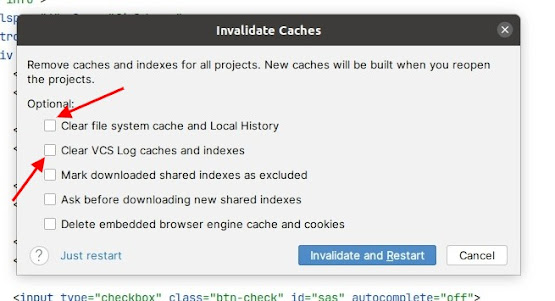
Idea PhpStorm - How to fix bugs with incorrect code Inspections and Autocomplete

Image
Sometimes IDE starts to show something unpredictable and strange behavior.  For example, PhpStorm says that class is not exist in your project. Or you set up incorrect namespace. Cause all of these things is broken indexes and IDE cache. To fix this problem easy:  Go to Main Menu -> Invalidate Caches Choose Clear file system cache and Local History. Check VCS log caches and indexes. Invalidate and Restart . After that your IDE restarts and relaunch with new indexes. All have to work correctly.

Idea PhpStorm - Database - No databases and tables, all is empty

Image
 Sometimes, when you add new project (site) and configure Database connection, the panel with tables is empty. Even if connection is green and all is OK.  To fix this problem, you just need to add necessary schemes in Database configuration. Go to "Data Source Properties" window. In opened window choose Schemas tab and select "All schemas" checkbox, or another one what you need. So, after saving changes, you see all tables in Database panel.